Setting Sail - From Oracle to PostgreSQL
Introduction
We have been using Oracle databases successfully for decades. They have been providing a rich reliable and performant feature set combined with enterprise level support. But the benefits to migrate from Oracle to PostgreSQL have become increasingly compelling. With Oracle licenses becoming increasingly expensive, especially in cloud environments, we have been looking for more cost effective solutions. In many usecases like local development CI/CD Testpipelines it is nowadays also often required to run databases in simple containers, which is not easily possible with Oracle. In this guide, you'll learn how to migrate from Oracle to PostgreSQL end to end, from assessing your existing setup, converting DDL and PL/SQL logic, handling blobs and hierarchical queries, to synchronizing data and optimizing your new PostgreSQL environment.
Why migrate from Oracle to PostgreSQL?
Cost of Oracle vs PostgreSQL
Oracle licensing is notoriously expensive. For businesses moving to the cloud or modernizing their application stack, every core, every feature, and every database instance adds to the bill. PostgreSQL, being open source, eliminates license costs and allows organizations to scale usage freely without financial penalties. Cloud vendors like AWS and GCP even offer fully managed PostgreSQL services that reduce operational overhead.
Flexibility and Cloud-native Adoption
PostgreSQL runs smoothly in containerized environments, making it a natural fit for CI/CD pipelines and microservice architectures. With lightweight images and the ability to spin up disposable environments, developers gain agility that is hard to achieve with traditional Oracle installations.
Modern Features and Open-source Ecosystem
PostgreSQL supports modern data types like JSONB and full text search out of the box. Its extension system allows integration with time series databases, geospatial data, and even machine learning tools. Meanwhile, the vibrant community ensures continuous evolution and faster access to innovations compared to proprietary roadmaps.
How to migrate from Oracle to PostgreSQL
To ensure a successful migration, it’s important to follow a structured approach. The process can be broken down into seven key steps, covering everything from initial assessment and planning to post-migration optimization and monitoring:

1. Assessment and planning
Start with a comprehensive inventory of your Oracle database usage including:
- Schemas: Determine the number and size of existing schemas
- Triggers and PL/SQL code: look out for Oracle specific functions like DECODE or CONNECT BY.
- Special tables, views or indices: You might have tables mapped from external servers, materialized views or special indexes on XML or JSON data
- Clients: Identify all clients using the database. Besides applications and services this might also include big data tools or administrative scripts.
- Other used functionality: Many of our applications relied on the user authentication provided by Oracle.
- Dependencies on external tools or storage: Where is the database persisted? What backup strategy is used? How is it monitored?
Ask yourself the following questions to improve your database structure, performance and tooling:
- Is there obsolete data that can be deleted?
- Should the database be split in multiple schemas or separate databases? This can improve performance for heavily used databases and also improve monitoring possibilities. Separation is in cloud environments also cost efficiently possible for low performance databases by combining multiple databases in one database service.
- Are there better alternatives for specific features like authentication (-> Keycloak), CBLOB (-> object storage), PL/SQLs (-> in application code)?
- What is the best tooling to work with the database? For Oracle many colleagues used SQL Navigator as a powerful tool to work with the database. With PostgreSQL many have switched to DBeaver, which provides many very helpful features.
Select a migration strategy. Choose between:
- Big Bang Migration: Fast but risky. Best for low usage or simple apps.
- Phased Migration: Migrate services or modules step by step. Use sync tools between Oracle and PostgreSQL.
- Dual Write: Keep both systems active temporarily. Useful for long parallel testing and gradual cutovers.
In our usecase with many applications relying on the same database, a Big Bang Migration was not possible. However, interaction of the applications on the database level was quite low. Therefore we decided to go for a Phased Migration, allowing us to migrate one application after another. In case an application required data not yet available in PostgreSQL, we synchronized the data from Oracle. With very few exceptions, we were able to keep that synchronization unidirectional.
2. Setup and configuration
Security and access management
As part of the migration, ensuring robust security measures is a top priority. Key aspects include:
- defining users and permissions
- securing database access
- encrypting data storage
For one customer we moved from an on-Premise Oracle database to AWS RDS - combining a migration of the database technology with a cloud transition. This approach also provided a key security benefit: Many cloud providers, AWS included, offer encryption as a built-in configuration option, allowing us to handle encryption at the infrastructure level.
Performance
As a foundation for smooth and efficient operation going forward it's important to properly size configuration parameters like work_mem (available RAM for queries) or maintenance_work_mem (maintenance RAM used for vacuuming). PGTune (https://pgtune.leopard.in.ua/) can help you determine suitable initial values. The tool creates an initial postgresql.conf based on your input for hardware and application settings.
Further configuration
Review the existing timeout settings in Oracle, paying attention to important values such as statement_timeout, which sets the maximum execution time for a single query, and idle_in_transaction_session_timeout, which defines how long a session can remain idle within a transaction. If long timeouts are in use, rather than migrating them directly to PostgreSQL, consider identifying long-running queries and optimizing or splitting them. For specific operations like report or statistics generation, it may be appropriate to extend timeouts only for these particular queries.
Additionally, for special use cases — such as accessing external databases, collecting statistics, or generating audit logs — PostgreSQL offers a variety of extensions. Be aware that not all extensions are supported in cloud-managed database services, so verify compatibility before deployment.
3. Schema migration
With the assessment and configuration finalized, you are ready to proceed with the schema migration.
DDL and Data Type Conversion
In our project, we began with a DDL transformation, converting the schema with the tool ora2pg. During this process, it can be helpful to improve table names, particularly if older Oracle versions limited them to 30 bytes. For more complex data transformations, we developed small Java applications, which also allowed us to reuse existing application logic during the migration.
When converting data types from Oracle to PostgreSQL, there are often multiple options available.
Oracle DATE for example can be converted into:
- timestamptz: if you want to represent certain points in time.
- timestamp: if you have timezone independend times like schedules
- date: if you only need the day without time
For VARCHAR2(n) you can chose between:
- CHAR(n): if you have fixed length strings
- VARCHAR(n): if you need to restrict the length on database level
- text: if you have variable text length (most often best choice)
You might also find XML or JSON data stored in VARCHAR2(n) columns. In this case you might have the chance to switch to xml or json type, providing better indexing and querying capabilities for the future.
Another important consideration is the migration of Large Objects (BLOBs and CLOBs). We decided to move large volumes of files from the Database to S3 and NFS stores. This reduces database size, simplifies backups and enhances scalability in cloud environments. However, caution is needed when modifying files within transactions or when synchronized backups of both data in the database and the file storage are required.
Converting Oracle PL/SQL to PL/pgSQL
PL/pgSQL is similar but not identical to PL/SQL.
The following table outlines a few examples how to rewrite your statements to PL/pgSQL:
| Oracle PL/SQL | Postgres PL/pgSQL | |
|---|---|---|
| Oracle special syntax for joins |
|
|
|
|
|
|
|
|
|
|
| Regular Expressions |
|
|
| List Aggregation |
|
|
Be aware of other differences such as:
EXCEPTIONhandling syntax differs- Oracle
OUTparameters must be adapted - Oracle's DECODE/NVL must be replaced with
CASEandCOALESCE.
We also used this chance to convert all remaining data from other encodings like ISO-8859-1 to UTF8.
4. Migrate applications
Differences in query language do not only concern your database but also your applications. Your code might contain Oracle specific SQL statements. These need to be adapted to PostgreSQL syntax.
Additionally, consider modernizing the way database updates are managed by using tools such as Liquibase or Flyway, which help automate schema changes and ensure consistency across environments.
5. Data transfer and synchronization
For an initial data migration, the tool ora2pg can be used to automatically generate INSERT statements. You may also consider to disable constraints and indexes temporarily for speed if required.
As outlined in the initial assessment and planning step, we chose a phased migration approach, moving one application at a time. During this process, some applications remain connected to the legacy Oracle database, while those already migrated are using the new PostgreSQL database. Consequently, we required a strategy to keep Oracle and PostgreSQL synchronized until the entire migration was complete.
We came up with the following architecture:
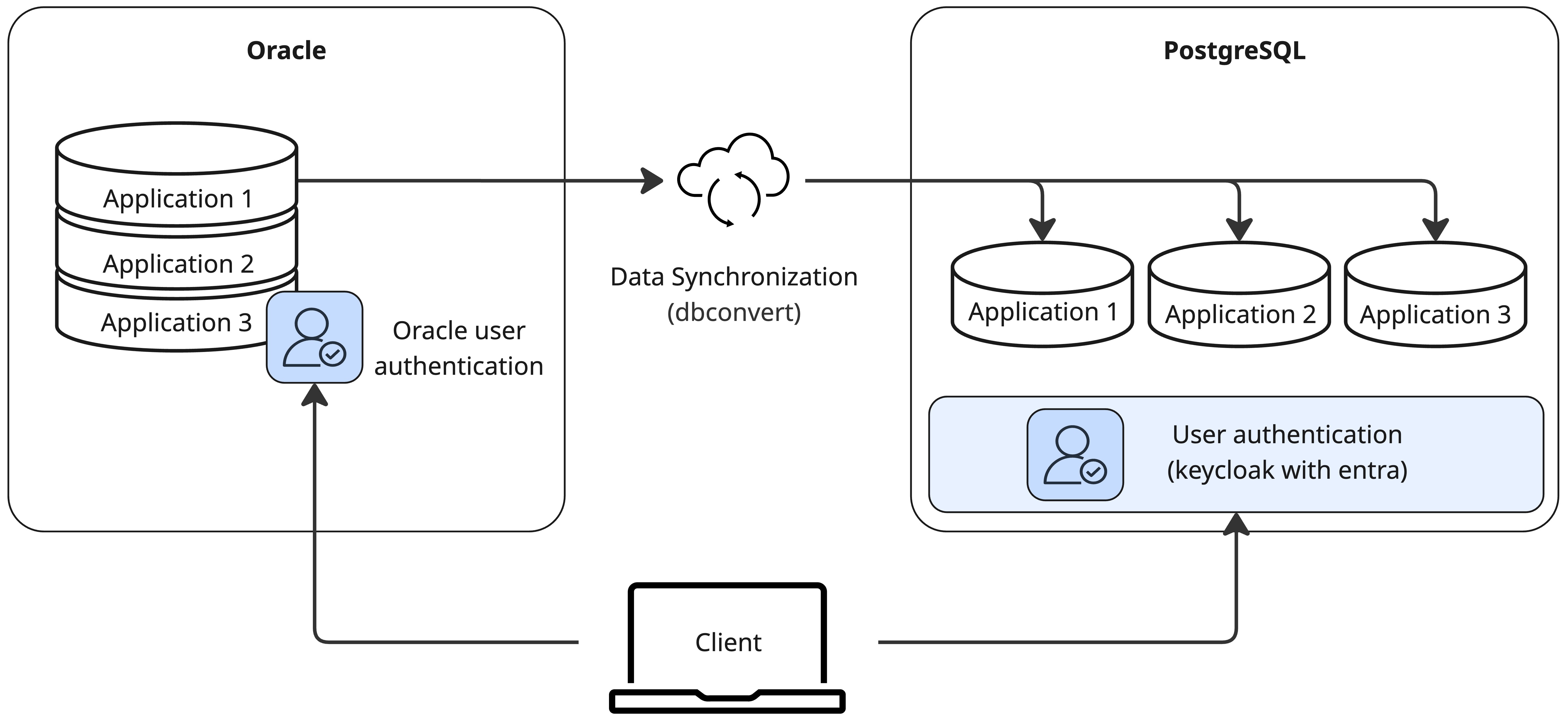
The ongoing synchronization is handled by DBConvert, using the trigger-based sync mode to track changes in the source Oracle database and apply them to the PostgreSQL target. DBConvert creates triggers on each table to capture inserts, updates, and deletes into a history_store table, which is then read and applied during synchronization runs. Daily synchronization jobs are scheduled to keep PostgreSQL closely aligned with Oracle.
We also tested multi-target scenarios, aiming at keeping more than one target database - for example a MSSQL and PostgreSQL database - synchronized with the source Oracle database at the same time. However DBConvert only supports one synchronization target per source due to shared trigger logic. As a workaround, cascading syncs Oracle → MSSQL → PostgreSQL can be setp up when needed
6. Post-Migration Query Optimization and Indexing
To ensure consistent operational performance we recommend performance tests and going through a process of query analysis and optimization.
To carry out performance tests we used JMeter to simulate realistic API requests and measure response times under load. To reflect peaks, we rerun the JMeter tests with increased the dataset size up to double of the production volume. This allowed to capture performance degradation under scale. Furthermore we logged and compared results to detect slow endpoints and associate them with expensive SQL queries in the backend.
We then analyzed problematic queries, using EXPLAIN (ANALYZE, BUFFERS, TIMING) SELECT... to inspect execution plans and find bottlenecks such as
- full table scans
- inefficient joins
- high buffer usage
We then optimized these queries by:
- restructuring logic to avoid scanning the full table multiple times
- replacing correlated subqueries (EXISTS + MAX) with ROW_NUMBER() for better performance
- moving complex expressions (e.g. nested COALESCE) into reusable computed fields for cleaner and faster execution
Our measured improvements before and after tuning were significant, achieving up to 56% faster execution times on key queries.
7. Backup and Monitoring
Last but not least, ensure your new PostgreSQL environment is robust and reliable with proper monitoring and backup strategies.
Monitoring should include measures to track database performance and monitoring errors. In a cloud environment, you can leverage built-in monitoring tools like AWS CloudWatch for RDS instances.
To automate backup creation, we leverage AWS’s built-in capabilities. AWS RDS supports point-in-time recovery, that enables cloud users to restore a database to any point in time within a defined retention window. Our backup strategy combines point-in-time recovery within a window of several days with scheduled weekly and monthly backups.
Key Takeaways
⭐ Cost savings and license freedom are major drivers for migration
⭐ Use tools like ora2pg, but expect manual work for PL/SQL, but expect manual work or rewrite PL/SQL code
⭐ Oracle-specific constructs need to be refactored thoughtfully
⭐ Rethink what truly belongs in a database—BLOBs and CLOBs are better suited for object storage.
⭐ Indexing, monitoring, and query tuning are essential after go-live
FAQs
Q1: What is a good tool to migrate from Oracle to PostgreSQL? A1: Ora2pg is the most common tool for schema and data. However, custom scripts are often needed for edge cases.
Q2: How do I handle Oracle BLOBs in PostgreSQL? A2: There are better ways to handle BLOBs than storing them in a database. Export and move them to object storage. Store the reference path in a text column.
Q3: Can Oracle triggers be directly used in PostgreSQL? A3: No. You must rewrite them in PL/pgSQL.
Q4: Does PostgreSQL support everything from Oracle? A4: Not everything. Some features like packages must be restructured, but the ecosystem offers powerful alternatives.
Conclusion and Call to Action
Migrating from Oracle to PostgreSQL is more than a technical migration, it’s a strategic move that unlocks cost savings, agility, and modern development practices. With thoughtful planning, the right tools, and expert guidance, organizations can successfully transform legacy database systems into scalable and cloud-ready architectures. At Steadforce, we specialize in guiding clients through every phase of this journey. Whether you need help converting PL/SQL, automating data transfer, or optimizing the final PostgreSQL setup, our team is ready to support you.
Get in touch with us to explore your Oracle to PostgreSQL migration options.